FAQ on unofficial WhatsApp in Kommo (amoCRM)
FAQ on the WhatsApp integration with Kommo (amoCRM): the chat button is missing, message errors, deals and notifications, chatbots, blocks and what to do if it stops.
Frequent questions about the unofficial WhatsApp integration with Kommo (amoCRM). If you don’t find the answer here, write to technical support.
Connection and setup
The WhatsApp button for starting a chat did not appear after the widget was installed
Clear the cache and cookies in your browser for all time — the button should appear.
If it didn’t, try opening Kommo in incognito mode or in another browser.
If there is no button in incognito either, re-save the widget in the personal account: Integrations → “Available” → your integration → “Connect in Kommo” → choose your Kommo account → “Allow”. After that, check the button again.
The QR code is not being scanned
Refresh the page with the code and scan it again.
If that didn’t work, restart the phone, refresh the page with the code and repeat.
If it still fails, ask technical support to restart the account and try once more.
Can I connect a telephony number?
Yes, if you can activate WhatsApp on that number through a confirmation call. During the activation you will have to switch off IVR (the voice menu) on the telephony number.
A toll-free 800 number cannot be activated in WhatsApp — confirmation codes do not arrive.
Is setting up regular WhatsApp any different from WhatsApp Business?
Yes. When you start the WhatsApp Business app, you enter the company name and the type of business. Contact details, products and the address are optional.
When you start the regular app as an individual, only a name is required.
Does the widget work only in one pipeline?
No, the integration works in all pipelines, no matter which pipeline the widget is connected to in the sources. Connecting the widget to a particular pipeline only defines where new requests will land.
Can I use your widget and another one at the same time?
You can, but only on different WhatsApp numbers.
Can I connect one more number to another pipeline if the domain is the same and the login is different?
Different logins are different users, not different accounts (domains) in Kommo. Different Kommo accounts have different domain names.
We can connect several numbers to one account (one domain) — see multiaccounting.
Do the numbers have to go to different pipelines?
You can send all the numbers to one pipeline. The only downside is that you won’t see which of your numbers the customer wrote to.
The trial period in Kommo has ended — can we keep working with current deals?
The integration should keep working for existing deals. Creating new deals and contacts won’t be possible.
Messages: sending and statuses
Why does a message get the Error status?
“Error” on sending appears when you write to a number that is not registered in WhatsApp.
If the customer’s number is registered in WhatsApp, check:
- The file size. The maximum is 100 MB.
- Your plan. On the Start plan you can begin up to 50 new dialogs per month per number. Once the limit is used up, an attempt to write first also ends with “Error” — you need the Standard plan with no limit. See the subscription tariffs.
Messages are not sent in one deal only and stay in the Sent status
If the integration is fine in general, there are two options:
- The recipient doesn’t have WhatsApp running, has no internet and so on — the messages don’t reach their phone.
- The recipient has blocked you.
What is the acceptable message delay?
The acceptable delay is 3–5 seconds.
Can I write from the phone after connecting the integration?
Yes, those messages will be pulled into the deal as well.
Can it happen that the sent message is not visible on the phone?
The chats may have gone to the archive, so they are not visible on the phone screen.
Type the customer’s number in the search and open the chat — the messages should be there.
Why is your number shown as offline?
We reply to you from Kommo and read your messages there. On the phone you write to, the messages stay unread, because we don’t physically touch that phone.
Why do links and phone numbers arrive as plain text?
WhatsApp turns links and phone numbers into clickable ones automatically: a link can be opened, a number can be called.
But when a person receives your message for the first time, they are offered a choice: add your number to contacts or report spam. Until they add your number to contacts or reply to the message themselves, links and numbers stay non-clickable.
Once your number is added to contacts or the message is answered, links and numbers become clickable.
Why does a YouTube link from Kommo arrive as a link and not as a video?
Kommo sends the link as text. This cannot be changed right now — that is how the integration works.
Are link clicks tracked in Kommo?
Kommo tracks clicks only on the links it wraps into its own amo.sh domain.
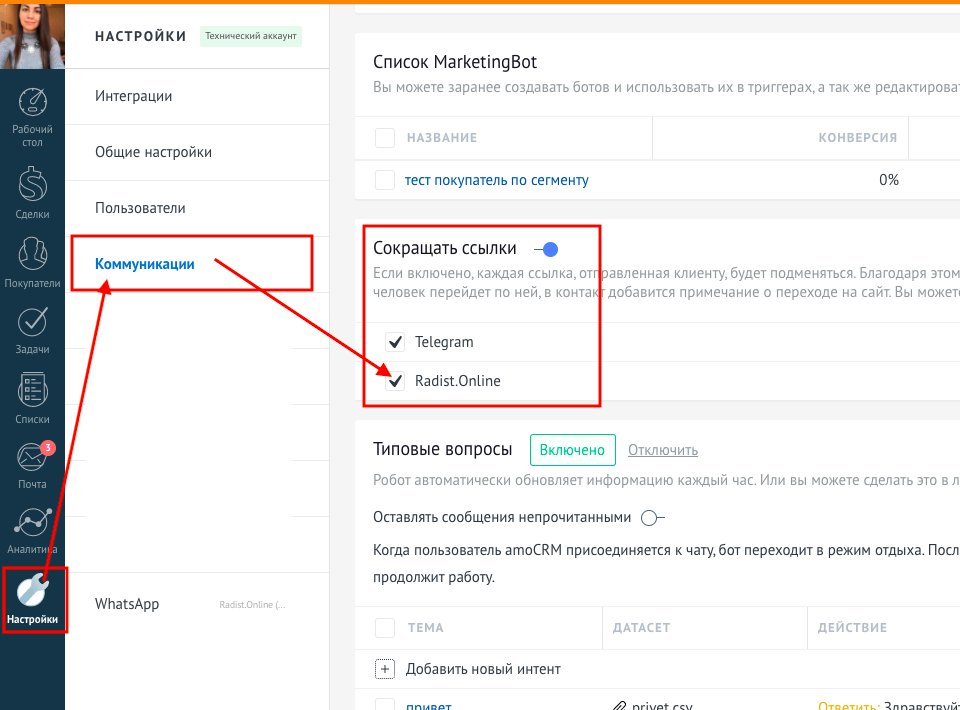
Turn on link shortening in the Kommo settings — then Kommo will also track clicks on links sent to WhatsApp.
Can I write to the customer first?
Yes. To write to a customer from Kommo, click the phone number in the contact card while you are in the deal, choose the WhatsApp button, type the message and send it.
Can I choose which number to write from?
Yes. Have a look at the multiaccounting guide.
We need a broadcast to our base without Kommo — is that possible?
Through the phone itself or third-party services: we have no mass mailing tools for that.
A broadcast to customers you already have a conversation with can be sent from the RadistWeb personal account.
Can I start a chat with a new contact from the Kommo mobile app?
Yes, the integration supports the Kommo mobile app: open the deal, click the phone number in the contact card and choose the WhatsApp button, just like in the web version.
Deals, contacts and notifications
Is the conversation saved in the deal?
Yes. If the deal is deleted, the conversation will be shown in the contact card.
Are a deal and a contact created when a customer writes?
Yes — the deal and the contact are created in the status you chose for creating deals in the integration settings in your RadistWeb personal account.
Why is no deal created for a contact that already exists in Kommo but has no active deal?
That is how Kommo works.
If you deleted the deal but not the contact, the conversation will be shown in the contact card. But the deal won’t be created by itself — you have to create it manually.
To create a deal for an existing contact:
- Open the customer’s contact card.
- Go to the “Deals” section.
- Create a new deal.
- Choose the status where the deal should be created.
- Save the deal.
The whole conversation with the customer will appear in this deal automatically.
Can all Kommo users chat on WhatsApp?
All Kommo users can chat from one connected number. The price does not change because of that.
Does it matter if managers work in Kommo under one account?
It does not affect the widget itself.
It only affects notifications: both managers receive the same ones, and if one of them reads a notification, it disappears for the other.
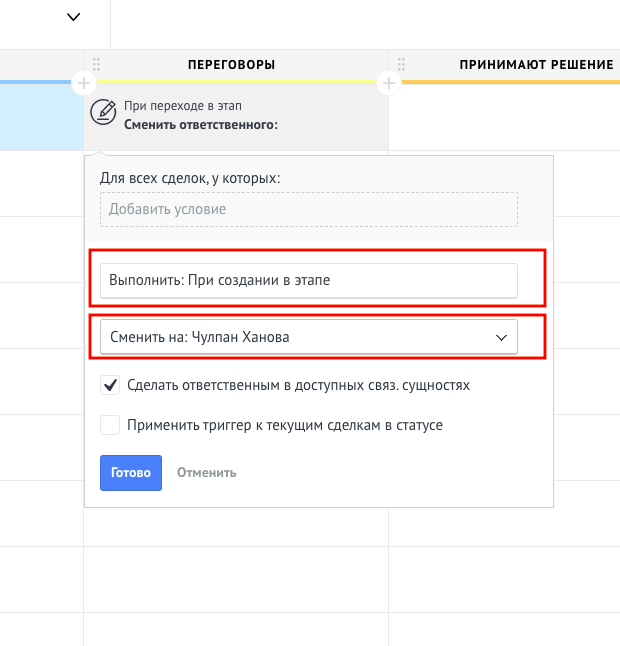
How do I change the responsible user when a new message comes in?
- Open the pipeline settings (the “Set up” button in the top right corner).
- Click the empty cell under the required pipeline status.
- Choose the “Change responsible user” trigger.
- Set the trigger to fire “On an incoming message from a chat”.
How do I make the admin responsible for all deals from WhatsApp?
In the status where WhatsApp deals are created, set up the “Change responsible user” trigger.
How do I set up notifications about an incoming message?
A notification about every new message works by default.
If there are no notifications, check the notification settings in the user profile — the “Chat messages” checkbox has to be ticked.
The notification goes to the user who is subscribed to the chat in the deal and to the user responsible for the deal. If you are neither subscribed nor responsible, the notification is not supposed to arrive.
Does a notification about a message come as a task for the responsible user?
By default every incoming message only produces a notification in the notification centre (the three dots in the left corner) for the manager responsible for the deal.
Tasks are not created by default, but they can be set up in the pipeline settings.
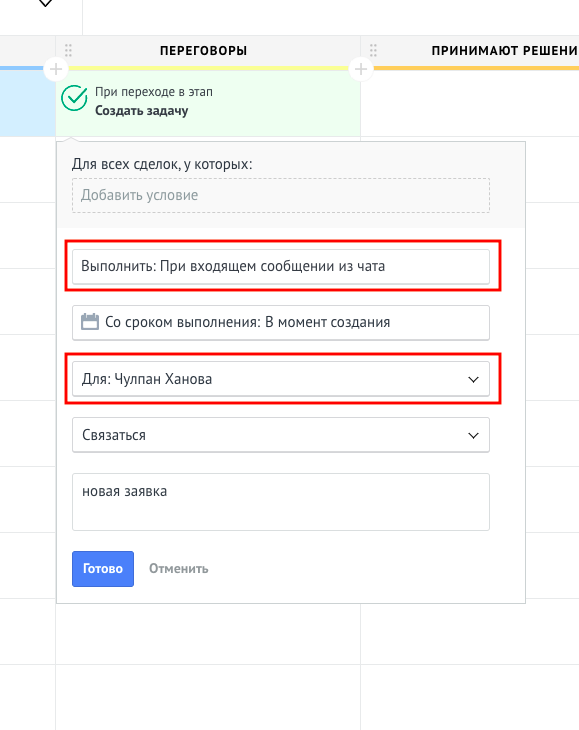
How do I create a task on an incoming message?
- Open the pipeline settings.
- Click the empty cell under the status where the task should be created.
- Choose the “Create task” trigger.
- In the “Perform” field set the value “On an incoming message from a chat”.
- Choose the manager the task is assigned to and add a comment if needed.
Can I add many deals to Kommo at once?
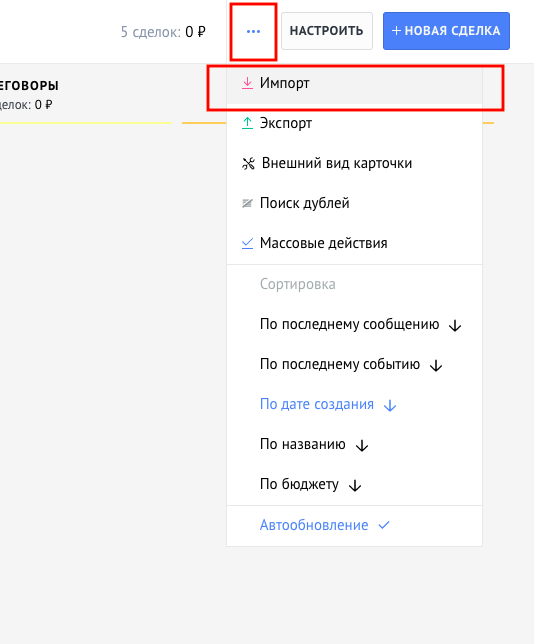
Yes, with the “Import” feature.
There are three dots in the top right corner — click them and you will see a list of features, including “Import”. The system opens a window where you can download a sample Excel file that shows how to format your base so it uploads to Kommo correctly.
Can messages from WhatsApp land in a particular status right away?
Yes. In the RadistWeb personal account you can choose the pipeline and the status where deals from WhatsApp are created.
If I create a group on the phone with the manager, the customer and the Kommo account, will the conversation be visible in the deal?
Yes. Our service supports group chats — you can write in Kommo and in RadistWeb chats.
The feature is off by default and has to be turned on in the personal account; group chats are available on the Standard plan. How to turn them on and how they work is in the group chats guide.
Bots and automation
Can I make buttons in a WhatsApp bot?
No. Buttons are not supported in the unofficial integration.
But you can build a bot menu with digits — see the guide with screenshots.
How is the sequence of questions and answers set up?
Through Salesbot — the Kommo tool for building chatbots. A basic setup is described in our menu in the chatbot guide.
How do I insert a value from a field into the bot?
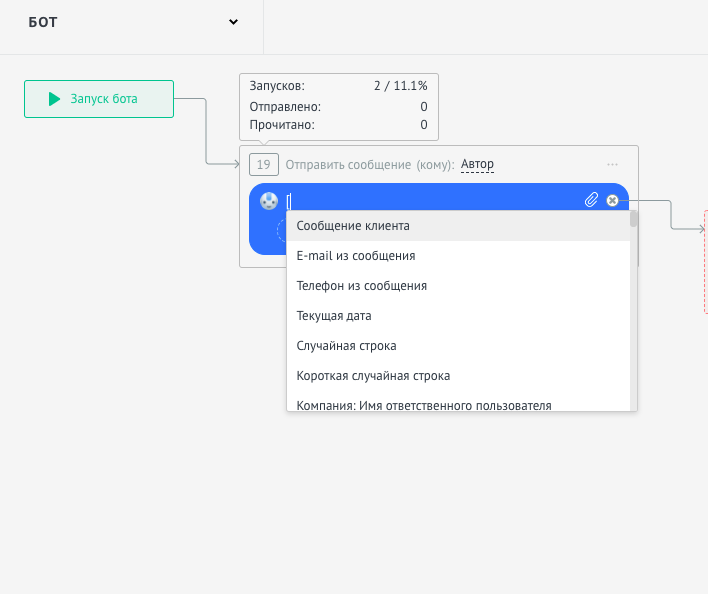
In the bot, start typing a square bracket [ in the message window — the system will show the list of all available fields.
How do I fill in deal fields with the bot?
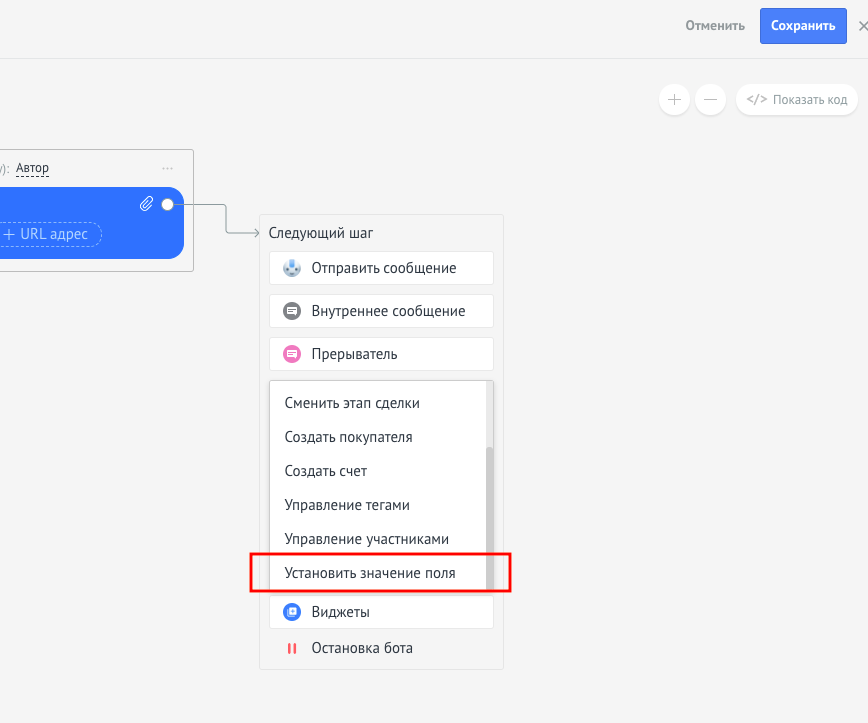
To fill in the fields of a deal, the bot has the “Set field value” function.
Can Salesbot write first?
It can, if the deal contains the customer’s phone number. For that the bot uses the “Initiate conversation” step, which starts the chat on WhatsApp.
How do I send a message to a customer right after an incoming call?
Set up a chatbot with the “Initiate conversation” function — the bot will start the WhatsApp chat itself using the number from the deal.
Can I make a bot that answers only those who call the WhatsApp number?
When a missed call comes from telephony, the deal can be created with a certain tag — a certain bot will be launched by that tag.
If a deal arrives without tags, it is most likely from a WhatsApp call, and another bot can be set up for it.
Blocks and limits
Why could the connected number be blocked?
WhatsApp may block a number for several reasons:
- you sent a lot of messages to people who don’t have your number in their contacts — that is, you started the chats;
- a lot of users blocked you within a short period by tapping “Spam”;
- you sent a lot of identical messages within a short period (a mass mailing).
Can I ask WhatsApp support for the reason of the block?
WhatsApp support never gives the exact reason for a block — the usual answer is that the policy was violated.
How many dialogs can I start first without getting blocked?
There is an unofficial figure: no more than 10% of the total number of customers who have saved your WhatsApp number in their phone contacts.
Why could the integration break?
- You opened WhatsApp Web.
- Your number was banned.
- WhatsApp was started on another phone (you changed the phone).
- WhatsApp was updated.
- The phone was restarted (this can sometimes be the reason).
What to do if the integration stopped working
Go through the steps below — in most cases the first one is enough.
1. Re-save the widget. Open the RadistWeb personal account → the “Integrations” section → in the “Available” category find your integration and click it → “Connect in Kommo” → choose your Kommo account → “Allow”. Then send yourself a test message and make sure it reaches Kommo.
2. Check the connection status. In the personal account go to the “Connections” section and look at the status of the number. “Connected” means the link is there; any other status already explains the reason — most often the QR code has to be scanned again.
3. If a message from the chatbot hangs in the “Sent” status. Check the chat with the customer on the phone. The customer may simply be offline: the message was sent but not read yet. If there is no message in the chat, write to our technical support.
How to send a contact to a customer
In Kommo you can send a contact to a customer so that a button for saving it to the phone appears in their WhatsApp app.
How to do it:
- Generate a contact in the vCard format (a file with the
.vcfextension) on any website, or export it from your phone book. - Send this file to the chat from Kommo or RadistWeb from the number of your unofficial WhatsApp.
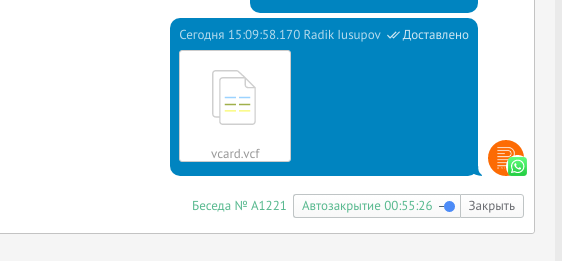
This is how the sent vCard file looks in Kommo:
An example from RadistWeb:
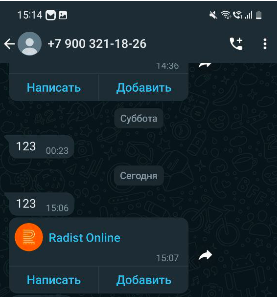
And this is how the file looks on the customer’s phone: