Unofficial WhatsApp for Kommo (amoCRM)
Unofficial WhatsApp integration with Kommo (amoCRM) by Radist.Online: chat inside deals, chatbots, mass chats, multiaccounting, group chats and known limitations.
The unofficial integration (also called “grey WhatsApp”) connects a regular WhatsApp or WhatsApp Business number — the same one you already use on your phone — to Kommo (amoCRM). The conversation lands right inside the deal, and every manager on your team can reply from there.
How to connect
Connecting takes two steps: first add your WhatsApp number in the RadistWeb personal account, then link it to Kommo. Both steps are in one guide.
What each plan includes is on the subscription tariffs page.
What the integration can do
Chatting inside a deal
- ✅ Talking to the customer on WhatsApp right in the Kommo deal card.
- ✅ The customer is addressed by name automatically.
- ✅ Sending and receiving files, videos, documents, location, audio and contacts.
- ✅ Listening to voice messages right in the deal, without downloading them.
- ✅ Notifications about missed WhatsApp calls.
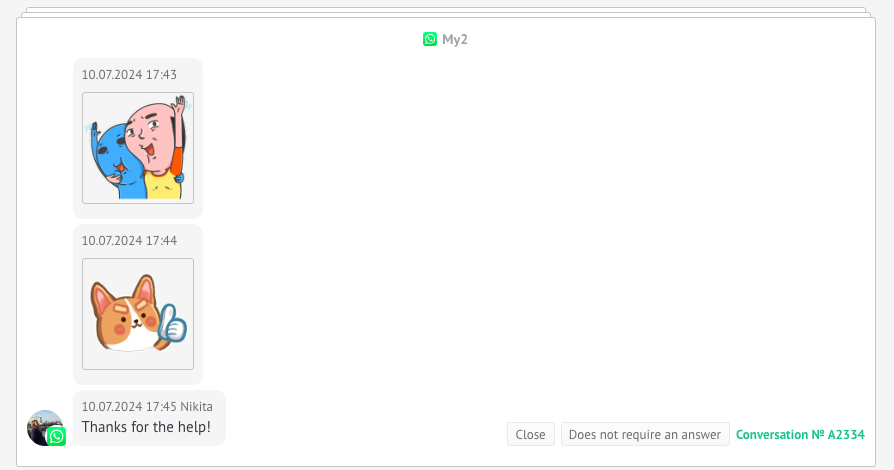
- ✅ Stickers:
- ✅ Group chats — available on the Standard plan.
- ✅ Working from the Kommo mobile app.
How to start a conversation first
- ✅ Starting a chat from the deal — with a check for whether the number is registered in WhatsApp, and the button hidden if it isn’t.
- ✅ Mass chat creation — start chats for a whole list of contacts at once.
- ✅ Multiaccounting — several numbers on one Kommo account, with a choice of which one to write from.
- ✅ WhatsApp business card — message contractors and performers whose contacts are not in the deal card.
- ✅ An automatic start of the chat through Salesbot, so the bot writes to the customer itself.
Automation and analytics
- ✅ Menu in the chatbot — a bot where the options are picked by digits.
- ✅ Number check in WhatsApp — if the number is not in WhatsApp, send a text, an email or perform another action.
- ✅ Broadcasts from the RadistWeb personal account — sent immediately or scheduled.
- ✅ Quick-reply templates — ready-made answers for your managers.
- ✅ Blacklist — numbers whose messages will not reach Kommo (Standard plan).
- ✅ End-to-end analytics — which sources bring customers from your website into messengers.
Kommo mobile app
The integration supports the Kommo mobile app: the WhatsApp conversation is available right in the deal from your phone, and you can start a chat with a new contact from there as well.
Limitations
The unofficial integration has limitations. They are not temporary — this is simply how work through the WhatsApp app is arranged:
- Buttons in chatbots are not supported. Build a menu with a choice by digits instead.
- Products are not supported — if a customer sends a product or a cart, the message will not reach the CRM.
- The maximum size of incoming and outgoing files is 100 MB.
- Several contact cards in one message will not arrive in the CRM (one card at a time is fine).
- Audio messages from the RadistWeb personal account do not reach recipients, although they are marked as delivered.
All guides in this section
Auto-notification about QR code scanning
If your phone disconnects from the service, we notify you automatically that the QR code has to be scanned again to restore the integration. To receive such notifications, set up the “Notifications” section in your personal account.
Company ID
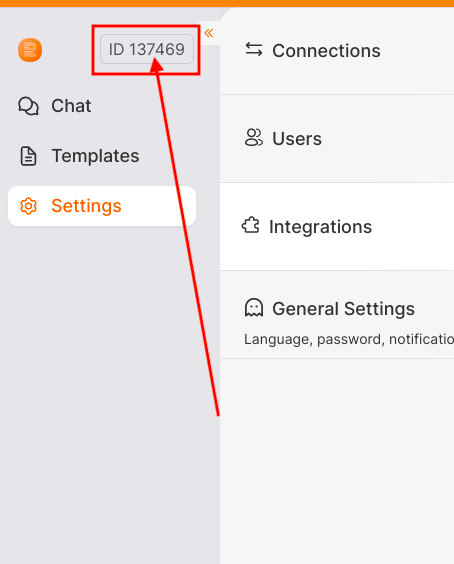
When your employee contacts technical support about the integration, they have to give the company ID from the personal account.
This is a matter of confidentiality — we need to be sure that the request comes from an employee of your company. Otherwise support may be refused until you confirm that this is your employee. Where to find the ID is shown in the screenshot below.