Telegram restrictions/Number bans
Learn about Telegram restrictions and number bans: why accounts get limited for spam, how temporary blocks work, how to appeal a ban via @SpamBot and what to answer to the bot's follow-up questions.
This article is compiled to familiarize you with the limitations of Telegram, which may lead to a temporary restriction of the use of Telegram or to the blocking of the number forever, based on:
- Telegram Terms of Service https://telegram.org/tos
- Telegram Privacy Policy https://telegram.org/privacy
- Spam FAQ https://telegram.org/faq_spam#q-what-do-i-do-now
- Materials from other Internet sources
- Our results of testing the work of Telegram
Our integration does not protect you from a number ban, so we recommend that you strictly comply with the Telegram Terms of Service.
If your Telegram number is blocked, we are not responsible for it, and the number ban is not the reason for the refund of the funds paid for the integration.
Terms of Service https://telegram.org/tos
By subscribing to Telegram, you accept our Privacy Policy and agree not to:
- Use our service to send spam or scam users.
- To promote violence on publicly available Telegram channels, bots, etc.
- To post illegal pornographic content on publicly available Telegram channels, bots, etc.
- We reserve the right to update these Terms of Service in the future.
- EU and UK citizens must be at least 16 years old to register
Telegram Privacy Policy https://telegram.org/privacy
You can read the entire policy at the link https://telegram.org/privacy
We will highlight the important point 5.3 in a separate paragraph below.
5.3. Spam and Abuse To prevent phishing, spam and other types of abuse and violations of the Telegram Terms of Service, our moderators can check messages that their recipients have informed them about. If the spam report in the message you sent is confirmed by our moderators, your account may be restricted from contacting strangers - temporarily or permanently. You can submit an appeal using @Spambot. In case of more serious violations, your account may be blocked. We can also use automated algorithms to analyze messages in cloud chats in order to prevent spam and phishing.
Spam FAQ https://telegram.org/faq_spam#q-what-do-i-do-now
Question: What happened to my account?
When users click the “Report Spam” button in a chat, they submit these messages to the Telegram moderator team for review. If the moderators decide that the posts deserve it, the account is temporarily restricted.
Q: So I won’t be able to send messages anymore?
No, it’s not that bad. Restricted accounts can send messages to people who have their number saved as a contact. You can also always reply to everyone who sent you a message first.
Question: Why was I reported?
Telegram username search is not a tool for finding new friends. People usually don’t like being contacted by strangers, so they report you if they find your messages annoying. Please contact people only if you are sure that they are waiting for messages from you. The same applies to adding people to unwanted groups and channels. In addition, group administrators can report users who post spam in their groups.
Question: Why can people report me?
For private messages, it doesn’t matter what exactly you send, if the recipients consider it undesirable. It can be a photo, a link to an invitation, or a simple “hello”. Please send messages only when you are sure that people will not mind receiving them.
Moderators are more lenient when it comes to messages in groups, but anyone who sends spam or unsolicited ads will be blocked.
Question: What should I do now?
If this is the first time this has happened to you (and you are not an industrial-scale spammer), most likely your account will be restricted for a few days or so. Please wait and take into account that people want to use the messenger in peace. Repeated violations will lead to a longer blocking period. If you continue to write unwanted messages to strangers, you may lose the ability to do this forever.
Question: I have read all of the above and I am sure that I did not break any rules!
If you are sure that the limit has been applied to your account illegally, please contact our @SpamBot.
Question: I know I made a mistake, please release me earlier!
We are very sorry, but this is not possible. Telegram values the inner peace of users too much.
Question: I have just registered and haven’t sent any messages yet, but my number is limited.
Some numbers may cause the Telegram system to react too sharply, either due to the actions of their previous owners, or due to the fact that these are certain virtual/VOIP numbers.
If you think this is your case, please contact @SpamBot and tell him your story.
What restrictions can there be and how to appeal a violation?
If Telegram users complain about an account, then Telegram robots or admins accept temporary restrictions to such an account or permanently block the number, depending on the severity of the violation (Telegram makes the decision to block the account based on its internal algorithms, which we do not know about).
If time restrictions are applied to the account, then when trying to send a message, the user will see an error with the following text:
Unfortunately, at the moment you can only send messages to mutual contacts.
That is, during the temporary ban, the user can send messages only to those contacts whose numbers are listed in the contacts in his phone, and also his phone number is listed in the contacts of the interlocutors. Also, the banned user will be able to respond to those contacts who wrote to him first.
To find out if the number is in the bath and how much, you need to write to the bot: @spambot and follow its instructions.
If you are blocked for the first time, your account will be blocked for about 24 hours.
If you are innocent of violations, you need to send a letter to spam@telegram.org , where to describe the situation in detail, if possible, supporting it with evidence. It will take some time, the support service is usually very busy. But after two or three days, restrictions can be removed from the account if the robot made a mistake in detecting a violation.
Below is a list where you can write a complaint or ask for help from Telegram support:
- the usual support can be found by going to the Telegram application Settings > Ask a question.
- you can also send a question to support via e-mail on the website: https://telegram.org/support
- to appeal the account ban, write to the bot @spambot or send an email to spam@telegram.org
How to appeal via @SpamBot
The bot shows the reason for the restriction and helps you submit an appeal.
Start the bot
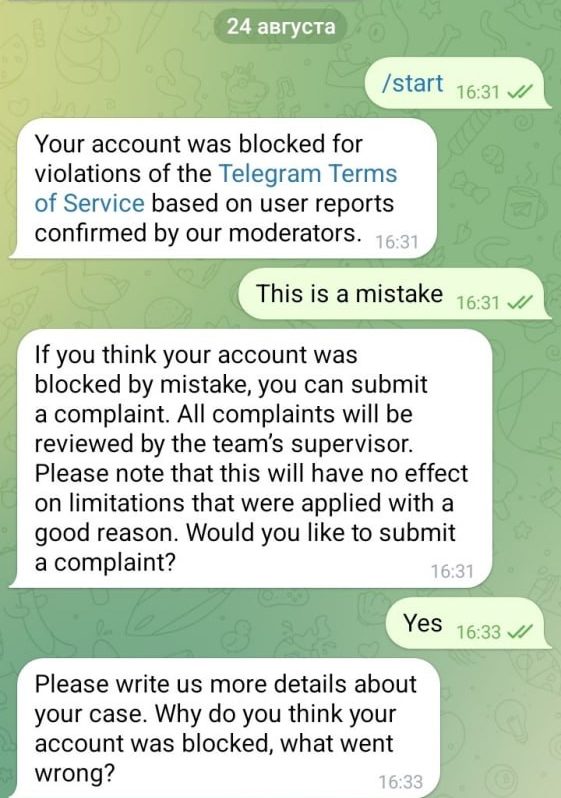
Find @SpamBot in Telegram, open the chat and send /start. The bot checks the account and shows whether any restrictions are active.
Tap «This is a mistake»
If an appeal is available, the bot offers the This is a mistake button. It then warns you that the complaint will be reviewed by the team’s supervisor, but that this has no effect on limitations applied with a good reason. Answer Yes.
Describe your case
Send the text of your appeal — briefly explain that you do not send spam and write only to clients who agreed to receive your messages.
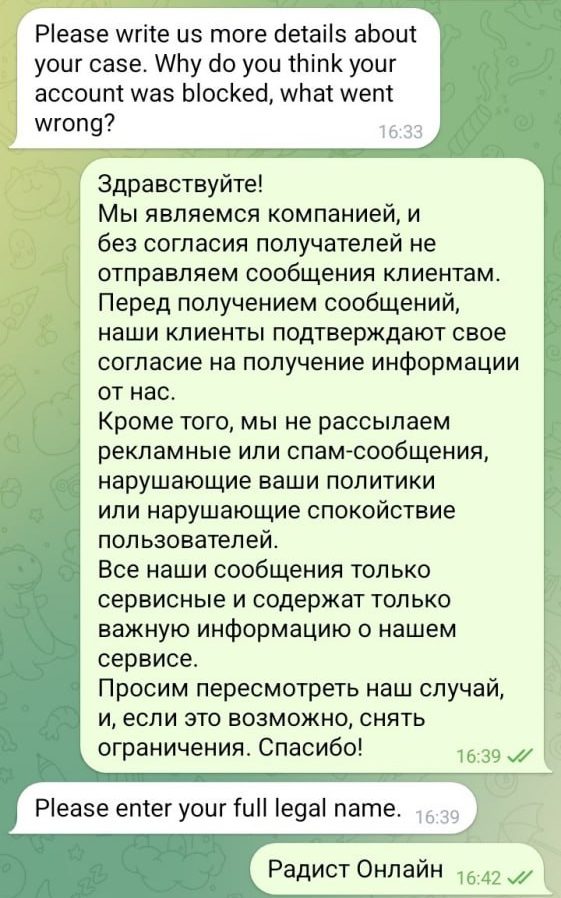
After that the bot starts asking follow-up questions. The first one is your full legal name.
Answer the follow-up questions
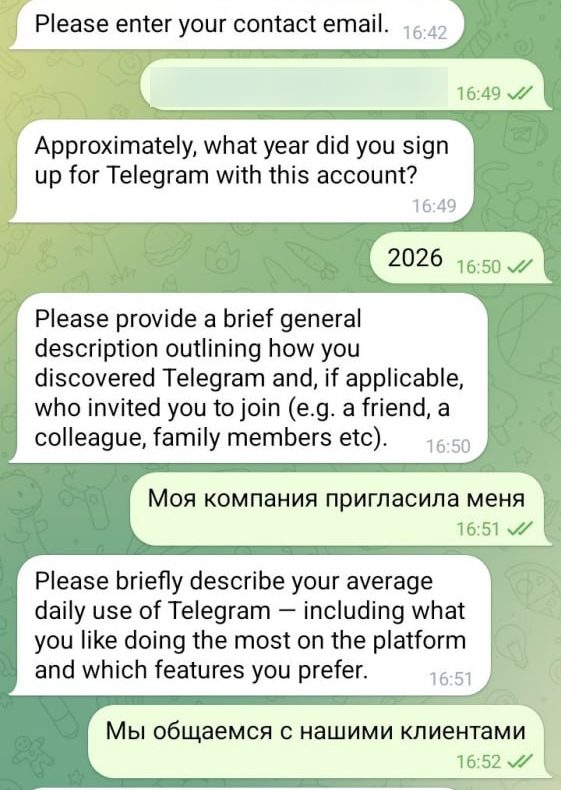
The bot asks for a contact email, the year of registration and a couple of questions about how you use Telegram. What to answer — see the table below.
Confirm and pass the human check
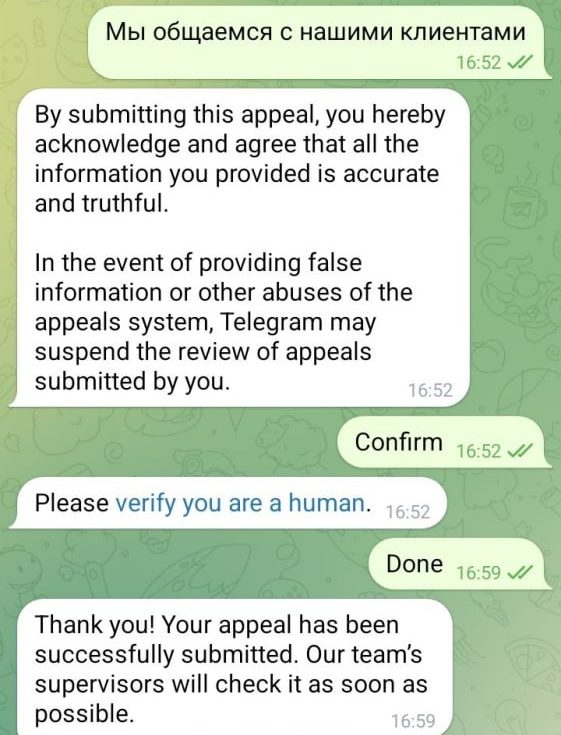
The bot asks you to confirm that everything you wrote is accurate — tap Confirm. Then it sends a verify you are a human link: follow it, pass the check, return to the chat and send Done.
Wait for the answer
You will get a confirmation that the appeal has been submitted. After that it only remains to wait for the Telegram team.
Follow-up questions and what to answer
| The bot’s question | What it asks and what to answer |
|---|---|
| Please enter your full legal name | The full legal name of your company or your brand name. For a personal account — your first and last name. |
| Please enter your contact email | A work email for contact. Use your own corporate address — Telegram will reply to it if needed. |
| Approximately, what year did you sign up for Telegram with this account? | The year the number was registered in Telegram. The exact date is not required; an approximate year is enough. |
| Please provide a brief general description outlining how you discovered Telegram and, if applicable, who invited you to join | How you found out about Telegram and who invited you. For a work number a short answer works: My company invited me. |
| Please briefly describe your average daily use of Telegram — including what you like doing the most and which features you prefer | How you normally use Telegram every day. One sentence to the point is enough: We communicate with our clients. |
What to do after the restrictions are lifted
If the appeal is approved, the bot sends a message saying the restrictions have been removed — together with two security recommendations.
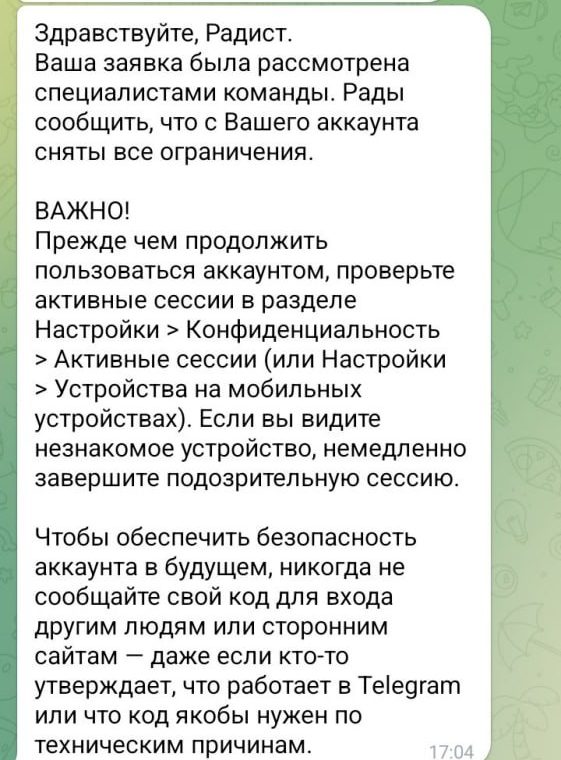
Before you continue working:
- check active sessions — Settings → Privacy → Active sessions (or Settings → Devices). If you see an unfamiliar device, terminate that session immediately;
- never share your login code with other people or third-party websites — even if someone claims to work at Telegram or says the code is needed for technical reasons.
Reasons why a message in amoCRM may be sent with an error:
- the client has blocked your number in Telegram;
- if an error appears when starting a chat from amoCRM, then perhaps the client’s number is not registered in Telegram;
- you got a Telegram number ban for violating the Telegram Terms (spam, mailing, often wrote unwanted messages to the first unknown contacts);
- the visibility of the client’s number is hidden in the Telegram settings.